Testing Visualizations: Import Dependencies in the Six Library
We’re building out visualization capabilities for lexq, our SPARQL query tool for code repositories. This post shows our first test: mapping import dependencies in the six Python 2/3 compatibility library.
The Visualization
Here’s what the import graph looks like:
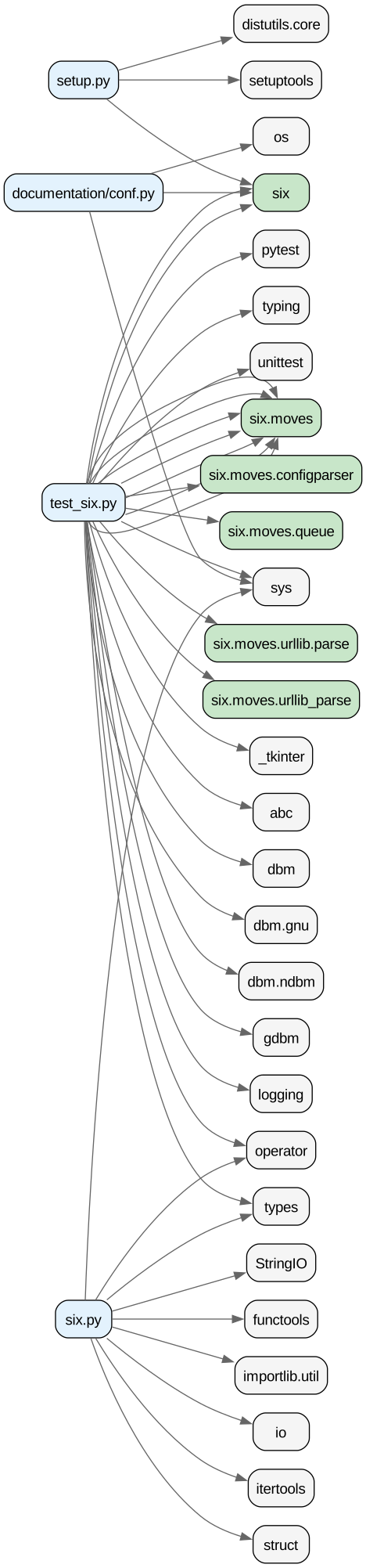
Legend:
- Blue boxes: Source files in the repository
- Green boxes: Internal imports (six modules)
- Gray boxes: External dependencies (standard library, setuptools, pytest)
What We Learned
The visualization immediately shows:
- test_six.py is the hub - Most imports flow from the test file, which makes sense for a compatibility library
- six.py is surprisingly simple - Only imports 8 modules (functools, io, itertools, operator, struct, sys, types, importlib.util)
- Heavy use of six.moves - The test file imports extensively from
six.moves, which provides Python 2/3 compatible names for moved modules
How We Built This
The entire workflow:
# 1. Query import statements from lexq
lexq query "
SELECT ?import ?importText
FROM <https://repolex.ai/data/benjaminp/six/filter/{commit}>
WHERE {
  { ?import a python:import_from_statement ; ts-core:text ?importText }
  UNION
  { ?import a python:import_statement ; ts-core:text ?importText }
}
"

# 2. Generate Graphviz DOT file
python create_graph.py

# 3. Render to SVG
dot -Tsvg imports.dot -o imports.svg
The file paths were embedded in the RDF URIs, so we extracted them with regex. Each import statement became an edge in the graph.
Interactive Version
We also generated D3.js data for an interactive version. The JSON format includes:
- 32 nodes (4 files + 28 modules)
- 41 import relationships
This could power a force-directed graph where you can:
- Hover to see details
- Click to filter by module type
- Drag nodes around
Next Steps
This was a simple test to validate our visualization pipeline. Future posts will explore:
- Call graphs - Function-level dependency mapping
- Architecture diagrams - Layer dependencies across larger repos
- Dead code heatmaps - Visualizing unused functions
- Complexity treemaps - Showing which files/functions are most complex
All queries and scripts are in our lexq repository.
This is part of our “build in public” series as we develop visualization capabilities for lexq. The goal: make code analysis visual and explorable, not just text-based queries.